

Chat Room Sharding
Overview
At high concurrency, a single chat room becomes hard to follow, messages scroll faster than anyone can read them.
Sharding splits one logical chat room into several parallel message streams ("shards"). Each user is assigned to one shard and sees the conversation happening there. The room itself doesn't change: one chat room ID, one configuration, one set of moderator controls. Sharding only changes which messages a given user actually receives.
Setting up Sharding
Sharding is configured per chat room, in the LiveLike CMS, when the room is created or edited.
-
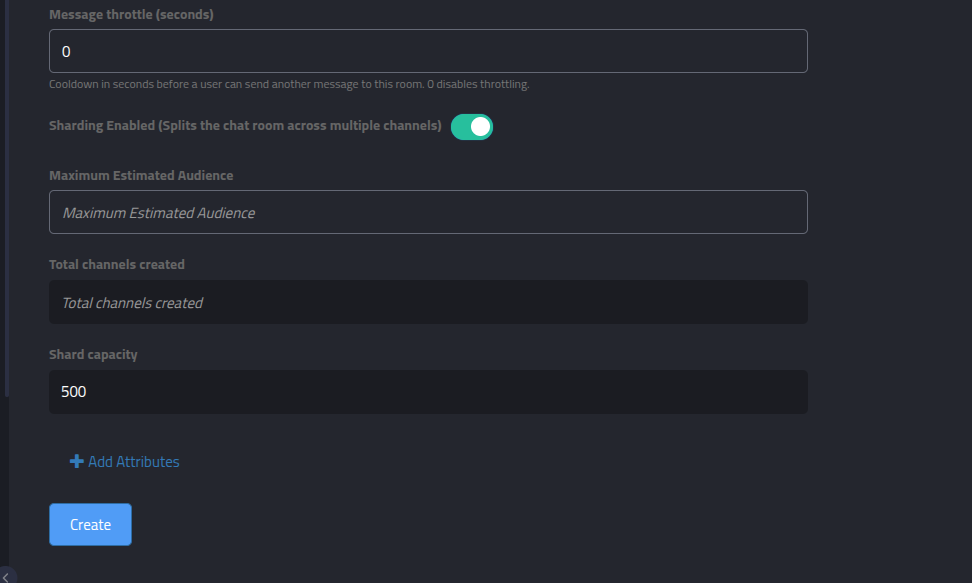
Sharding Enabled — toggle to turn sharding on for this room. Leave it off and the room behaves exactly as it does today: a single, unsharded channel.
-
Maximum Estimated Audience — your estimate of peak concurrent users in the room. This is the only value you set; everything else is derived from it.
-
Total channels created — read-only. The number of shards the room is split into, calculated as ceil(Maximum Estimated Audience / shard capacity).
-
Shard capacity — read-only, defaults to 500 users per shard.
Shard capacity is managed by LiveLikePer-shard capacity is set by LiveLike engineering, not by producers. If you expect an audience that would benefit from a different capacity, contact your LiveLike POC.
No SDK changes are required. Shard assignment happens on our servers when a client fetches chat room details, and is returned through the same channels field your app already uses to connect to chat, turning sharding on for a room just changes which channel name comes back for a given user.
How users are distributed
- Shard count is derived from the audience estimate: ceil(max estimated audience / shard capacity).
- Each user is assigned to a shard deterministically, based on their user ID, distribution is even across shards.
- A user returns to the same shard on reconnect, across sessions and devices, as long as the room's shard count hasn't changed.
- The estimate is a sizing input, not a hard cap. If more users show up than estimated, existing shards simply run denser, nobody is blocked or turned away.
What's shard-scoped vs. room-wide
Not everything in chat is split by shard. Some things are deliberately scoped to a user's own shard; others always reach everyone in the room, regardless of shard.
Shard-scoped
Messages
Replies
Quote Messages
Mentions
Room-wide
Pinned Messages
Announcements (Custom Messages)
Moderation Actions
Message deletion is the one moderator action that's shard-scoped rather than room-wide: a deleted message disappears only on the shard it was posted to, since that's the only shard that ever saw it in the first place.
Replies, quotes, and mentions stay within a shardYou can't reply to, quote, or mention a message/user that isn't visible in your own shard, since the notification would never reach across shard boundaries, the action is rejected outright.
Pinned messages, announcements, and moderator mutes always show up for every user in the room no matter their shard, because those live on the room's shared control channels rather than any one shard's channel.
Use this to your advantage: anything that must reach every user in the room, a host announcement, a giveaway winner, a moderation notice, should go out as a custom message or a pinned message, not a regular chat message. A host or talent account posting normal chat messages will only reach the shard they happen to land in.
Changing the audience estimate on a live room
Avoid changing the audience estimate once a room is already live. Shard assignment is calculated fresh every time rather than stored, so updating the estimate recomputes the shard count and every user is re-evaluated against it on their next reconnect, with no guarantee they land on the same shard as before, and no migration of message history between shards. Mid-event resharding will visibly disrupt active conversations.
Things to keep in mind
- Sharding is optional, per room. Rooms that comfortably stay within normal concurrency don't need it.
- Users only see their own shard's conversation. This is the trade-off that makes sharding work at scale, plan any content that needs universal reach (see above) accordingly.
- Don't change the estimate once a room is live (see above).
- Estimate realistically. Under-estimating is safe, shards just run a bit denser. Over-estimating spreads a modest audience across too many shards, and chat can feel empty.
What we need from you
- Which rooms should be sharded.
- A peak concurrent audience estimate for each of those rooms, ahead of the event.
Updated about 1 month ago